



Jina Embeddings 和 Jina Reranker 现已可以通过 AWS Marketplace 在 Amazon SageMaker 上使用。对于高度重视安全性、可靠性和云操作一致性的企业用户来说,这将 Jina AI 的最先进 AI 技术引入他们的私有 AWS 部署中,让他们能够享受 AWS 成熟、稳定的基础设施带来的所有好处。
通过我们在 AWS Marketplace 上提供的全系列嵌入和重排序模型,SageMaker 用户可以以具有竞争力的价格按需使用突破性的 8k 输入上下文窗口和排名领先的多语言嵌入。您无需支付将模型传入或传出 AWS 的费用,价格透明,账单与您的 AWS 账户集成。
目前在 Amazon SageMaker 上可用的模型包括:
- Jina Embeddings v2 Base - English
- Jina Embeddings v2 Small - English
- Jina Embeddings v2 双语模型:
- Jina Embeddings v2 Base - Code
- Jina Reranker v1 Base - English
- Jina ColBERT v1 - English
- Jina ColBERT Reranker v1 - English
完整的模型列表请访问 AWS Marketplace 上的 Jina AI 供应商页面,并享受七天免费试用。


本文将指导您完全使用 Amazon SageMaker 的组件创建一个检索增强生成(RAG)应用程序。我们将使用的模型包括 Jina Embeddings v2 - English、Jina Reranker v1 和 Mistral-7B-Instruct 大语言模型。
您也可以跟随 Python Notebook 进行学习,您可以下载或在 Google Colab 上运行。
tag检索增强生成
检索增强生成是生成式 AI 的另一种范式。它不是直接使用大语言模型(LLM)基于训练中学到的知识来回答用户请求,而是利用它们流畅的语言生成能力,同时将逻辑和信息检索转移到更适合的外部设备上。
在调用 LLM 之前,RAG 系统会主动从某些外部数据源检索相关信息,然后将其作为提示的一部分输入 LLM。LLM 的角色是将外部信息合成为对用户请求的连贯响应,最大限度地降低幻觉风险,提高响应的相关性和实用性。
RAG 系统在结构上至少有四个组件:
- 数据源,通常是某种向量数据库,适用于 AI 辅助信息检索。
- 信息检索系统,将用户的请求作为查询,并检索与回答相关的数据。
- 一个系统,通常包括基于 AI 的重排序器,用于选择部分检索到的数据并将其处理成 LLM 的提示。
- LLM,例如 GPT 模型之一或像 Mistral 这样的开源 LLM,它接收用户请求和提供的数据,并为用户生成响应。
嵌入模型非常适合信息检索,并经常用于这个目的。文本嵌入模型将文本作为输入,输出一个嵌入——一个高维向量——其与其他嵌入的空间关系表明它们的语义相似性,即相似的主题、内容和相关含义。它们经常用于信息检索,因为嵌入越接近,用户对响应的满意度就越高。它们也相对容易微调以提高在特定领域的性能。
文本重排序模型使用类似的 AI 原理来比较文本集合与查询,并按其语义相似性对它们进行排序。使用特定任务的重排序模型,而不是仅仅依赖嵌入模型,通常会显著提高搜索结果的精确度。RAG 应用中的重排序器会选择信息检索结果中的一部分,以最大化在提示中包含正确信息的概率。


tag作为 SageMaker 端点的嵌入模型性能基准测试
我们测试了在 g4dn.xlarge 实例上运行的 Jina Embeddings v2 Base - English 模型作为 SageMaker 端点的性能和可靠性。在这些实验中,我们每秒持续产生一个新用户,每个用户都会发送请求,等待响应,并在收到响应后重复。
- 对于少于 100 个令牌的请求,在最多 150 个并发用户的情况下,每个请求的响应时间保持在 100ms 以下。然后,随着更多并发用户的加入,响应时间从 100ms 线性增加到 1500ms。
- 在大约300 个并发用户时,我们收到来自 API 的超过 5 次失败,并结束了测试。
- 对于 1K 到 8K 令牌之间的请求,在最多 20 个并发用户的情况下,每个请求的响应时间保持在 8s 以下。然后,随着更多并发用户的加入,响应时间从 8s 线性增加到 60s。
- 在大约140 个并发用户时,我们收到来自 API 的超过 5 次失败,并结束了测试。

基于这些结果,我们可以得出结论:对于大多数具有正常 embedding 工作负载的用户来说,g4dn.xlarge 或 g5.xlarge 实例应该能满足他们的日常需求。然而,对于大规模索引任务(通常执行频率远低于搜索任务),用户可能会倾向于选择性能更强的选项。有关所有可用的 Sagemaker 实例,请参考 AWS 的 EC2 概览。
tag配置您的 AWS 账户
首先,您需要拥有一个 AWS 账户。如果您还不是 AWS 用户,您可以在 AWS 网站上注册一个账户。

tag在 Python 环境中设置 AWS 工具
在您的 Python 环境中安装本教程所需的 AWS 工具和库:
pip install awscli jina-sagemaker
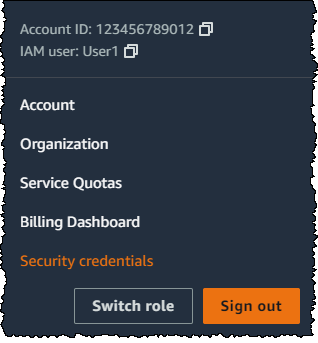
您需要为您的 AWS 账户获取访问密钥和秘密访问密钥。请按照 AWS 网站上的说明进行操作。

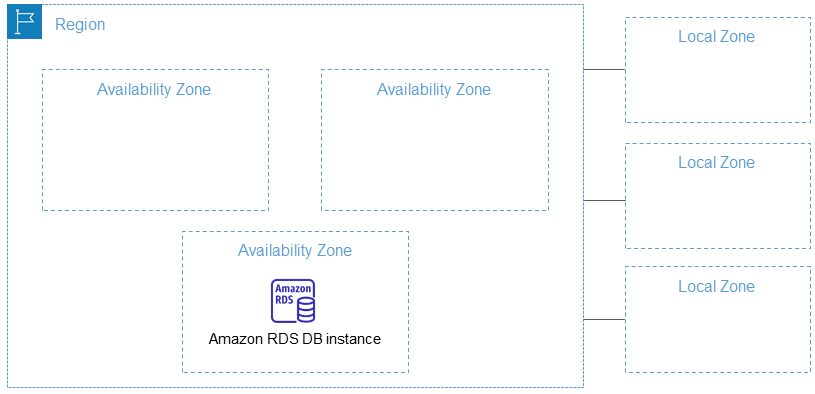
您还需要选择一个AWS 区域进行工作。
然后,在环境变量中设置这些值。在 Python 或 Python notebook 中,您可以使用以下代码:
import os
os.environ["AWS_ACCESS_KEY_ID"] = <YOUR_ACCESS_KEY_ID>
os.environ["AWS_SECRET_ACCESS_KEY"] = <YOUR_SECRET_ACCESS_KEY>
os.environ["AWS_DEFAULT_REGION"] = <YOUR_AWS_REGION>
os.environ["AWS_DEFAULT_OUTPUT"] = "json"
将默认输出设置为 json。
您也可以通过 AWS 命令行应用程序或在本地文件系统上设置 AWS 配置文件来完成此操作。更多详情请参见 AWS 网站上的文档。
tag创建角色
您还需要一个具有足够权限的 AWS 角色来使用本教程所需的资源。
该角色必须:
- 启用 AmazonSageMakerFullAccess。
- 满足以下条件之一:
- 具有创建 AWS Marketplace 订阅的权限,并启用以下三项:
- aws-marketplace:ViewSubscriptions
- aws-marketplace:Unsubscribe
- aws-marketplace:Subscribe
- 或者您的 AWS 账户已订阅 jina-embedding-model。
- 具有创建 AWS Marketplace 订阅的权限,并启用以下三项:
将角色的 ARN(Amazon Resource Name)存储在变量名 role 中:
role = <YOUR_ROLE_ARN>
有关角色的更多信息,请参见 AWS 网站上的文档。
tag在 AWS Marketplace 上订阅 Jina AI 模型
在本文中,我们将使用 Jina Embeddings v2 base English 模型。请在 AWS Marketplace 上订阅它。
向下滚动页面即可看到定价信息。AWS 对来自 marketplace 的模型按小时收费,因此从您启动模型端点到停止它期间的时间都会计费。本文将向您展示如何进行这两项操作。
我们还将使用 Jina Reranker v1 - English 模型,您需要订阅该模型。
当您订阅这些模型后,获取您所在 AWS 区域的模型 ARN,并将它们分别存储在变量名 embedding_package_arn 和 reranker_package_arn 中。本教程中的代码将使用这些变量名来引用它们。
如果您不知道如何获取 ARN,请将您的 Amazon 区域名称放入变量 region 中,并使用以下代码:
region = os.environ["AWS_DEFAULT_REGION"]
def get_arn_for_model(region_name, model_name):
model_package_map = {
"us-east-1": f"arn:aws:sagemaker:us-east-1:253352124568:model-package/{model_name}",
"us-east-2": f"arn:aws:sagemaker:us-east-2:057799348421:model-package/{model_name}",
"us-west-1": f"arn:aws:sagemaker:us-west-1:382657785993:model-package/{model_name}",
"us-west-2": f"arn:aws:sagemaker:us-west-2:594846645681:model-package/{model_name}",
"ca-central-1": f"arn:aws:sagemaker:ca-central-1:470592106596:model-package/{model_name}",
"eu-central-1": f"arn:aws:sagemaker:eu-central-1:446921602837:model-package/{model_name}",
"eu-west-1": f"arn:aws:sagemaker:eu-west-1:985815980388:model-package/{model_name}",
"eu-west-2": f"arn:aws:sagemaker:eu-west-2:856760150666:model-package/{model_name}",
"eu-west-3": f"arn:aws:sagemaker:eu-west-3:843114510376:model-package/{model_name}",
"eu-north-1": f"arn:aws:sagemaker:eu-north-1:136758871317:model-package/{model_name}",
"ap-southeast-1": f"arn:aws:sagemaker:ap-southeast-1:192199979996:model-package/{model_name}",
"ap-southeast-2": f"arn:aws:sagemaker:ap-southeast-2:666831318237:model-package/{model_name}",
"ap-northeast-2": f"arn:aws:sagemaker:ap-northeast-2:745090734665:model-package/{model_name}",
"ap-northeast-1": f"arn:aws:sagemaker:ap-northeast-1:977537786026:model-package/{model_name}",
"ap-south-1": f"arn:aws:sagemaker:ap-south-1:077584701553:model-package/{model_name}",
"sa-east-1": f"arn:aws:sagemaker:sa-east-1:270155090741:model-package/{model_name}",
}
return model_package_map[region_name]
embedding_package_arn = get_arn_for_model(region, "jina-embeddings-v2-base-en")
reranker_package_arn = get_arn_for_model(region, "jina-reranker-v1-base-en")
tag加载数据集
在本教程中,我们将使用来自 YouTube 频道 TU Delft Online Learning 提供的视频集合。该频道制作了各种 STEM 学科的教育材料。其内容采用 CC-BY 许可。


我们从该频道下载了 193 个视频,并使用 OpenAI 的开源 Whisper 语音识别模型对其进行处理。我们使用最小的模型 openai/whisper-tiny 将视频转换为文字记录。
这些文字记录已被整理成一个 CSV 文件,您可以从这里下载。
文件的每一行包含:
- 视频标题
- YouTube 上的视频 URL
- 视频的文字记录
要在 Python 中加载这些数据,首先安装 pandas 和 requests:
pip install requests pandas
直接将 CSV 数据加载到名为 tu_delft_dataframe 的 Pandas DataFrame 中:
import pandas
# Load the CSV file
tu_delft_dataframe = pandas.read_csv("https://raw.githubusercontent.com/jina-ai/workshops/feat-sagemaker-post/notebooks/embeddings/sagemaker/tu_delft.csv")
您可以使用 DataFrame 的 head() 方法查看内容。在笔记本中,它看起来应该像这样:

您也可以使用数据集中给出的 URL 观看视频,并验证语音识别虽然不完美但基本准确。
tag启动 Jina Embeddings v2 端点
以下代码将在 AWS 上启动一个 ml.g4dn.xlarge 实例来运行嵌入模型。这可能需要几分钟才能完成。
import boto3
from jina_sagemaker import Client
# Choose a name for your embedding endpoint. It can be anything convenient.
embeddings_endpoint_name = "jina_embedding"
embedding_client = Client(region_name=boto3.Session().region_name)
embedding_client.create_endpoint(
arn=embedding_package_arn,
role=role,
endpoint_name=embeddings_endpoint_name,
instance_type="ml.g4dn.xlarge",
n_instances=1,
)
embedding_client.connect_to_endpoint(endpoint_name=embeddings_endpoint_name)
如果需要,可以通过更改 instance_type 来选择不同的 AWS 云实例类型。
tag构建和索引数据集
现在我们已经加载了数据并运行了 Jina Embeddings v2 模型,我们可以准备和索引数据了。我们将在 FAISS 向量存储中存储数据,这是一个专门为 AI 应用设计的开源向量数据库。
首先,安装 RAG 应用程序的其余依赖项:
pip install tdqm numpy faiss-cpu
tag分块
我们需要将单个文字记录分成更小的部分,即"块",以便我们可以在 LLM 的提示中适应多个文本。以下代码将在句子边界处将单个文字记录分开,确保所有块默认不超过 128 个单词。
def chunk_text(text, max_words=128):
"""
Divide text into chunks where each chunk contains the maximum number
of full sentences with fewer words than `max_words`.
"""
sentences = text.split(".")
chunk = []
word_count = 0
for sentence in sentences:
sentence = sentence.strip(".")
if not sentence:
continue
words_in_sentence = len(sentence.split())
if word_count + words_in_sentence <= max_words:
chunk.append(sentence)
word_count += words_in_sentence
else:
# Yield the current chunk and start a new one
if chunk:
yield ". ".join(chunk).strip() + "."
chunk = [sentence]
word_count = words_in_sentence
# Yield the last chunk if it's not empty
if chunk:
yield " ".join(chunk).strip() + "."tag为每个文本块获取嵌入向量
我们需要为每个文本块生成嵌入向量以存储在 FAISS 数据库中。为了获取这些向量,我们将文本块传递给 Jina AI embedding 模型端点,使用 embedding_client.embed() 方法。然后,我们将文本块和嵌入向量作为新列 chunks 和 embeddings 添加到 pandas 数据框 tu_delft_dataframe 中:
import numpy as np
from tqdm import tqdm
tqdm.pandas()
def generate_embeddings(text_df):
chunks = list(chunk_text(text_df["Text"]))
embeddings = []
for i, chunk in enumerate(chunks):
response = embedding_client.embed(texts=[chunk])
chunk_embedding = response[0]["embedding"]
embeddings.append(np.array(chunk_embedding))
text_df["chunks"] = chunks
text_df["embeddings"] = embeddings
return text_df
print("Embedding text chunks ...")
tu_delft_dataframe = generate_embeddings(tu_delft_dataframe)
## if you are using Google Colab or a Python notebook, you can
## delete the line above and uncomment the following line instead:
# tu_delft_dataframe = tu_delft_dataframe.progress_apply(generate_embeddings, axis=1)
tag使用 Faiss 设置语义搜索
下面的代码创建一个 FAISS 数据库,并通过迭代 tu_delft_pandas 插入文本块和嵌入向量:
import faiss
dim = 768 # dimension of Jina v2 embeddings
index_with_ids = faiss.IndexIDMap(faiss.IndexFlatIP(dim))
k = 0
doc_ref = dict()
for idx, row in tu_delft_dataframe.iterrows():
embeddings = row["embeddings"]
for i, embedding in enumerate(embeddings):
normalized_embedding = np.ascontiguousarray(np.array(embedding, dtype="float32").reshape(1, -1))
faiss.normalize_L2(normalized_embedding)
index_with_ids.add_with_ids(normalized_embedding, k)
doc_ref[k] = (row["chunks"][i], idx)
k += 1
tag启动 Jina Reranker v1 端点
与上面的 Jina Embedding v2 模型一样,这段代码将在 AWS 上启动一个 ml.g4dn.xlarge 实例来运行重排序模型。同样,运行可能需要几分钟时间。
import boto3
from jina_sagemaker import Client
# Choose a name for your reranker endpoint. It can be anything convenient.
reranker_endpoint_name = "jina_reranker"
reranker_client = Client(region_name=boto3.Session().region_name)
reranker_client.create_endpoint(
arn=reranker_package_arn,
role=role,
endpoint_name=reranker_endpoint_name,
instance_type="ml.g4dn.xlarge",
n_instances=1,
)
reranker_client.connect_to_endpoint(endpoint_name=reranker_endpoint_name)
tag定义查询函数
接下来,我们将定义一个函数,用于识别与任何文本查询最相似的文本片段。
这是一个两步过程:
- 使用
embedding_client.embed()方法将用户输入转换为嵌入向量,就像我们在数据准备阶段所做的那样。 - 将嵌入向量传递给 FAISS 索引以检索最佳匹配。在下面的函数中,默认返回 20 个最佳匹配,但您可以通过
n参数控制这个数量。
函数 find_most_similar_transcript_segment 将通过比较存储的嵌入向量与查询嵌入向量的余弦相似度来返回最佳匹配。
def find_most_similar_transcript_segment(query, n=20):
query_embedding = embedding_client.embed(texts=[query])[0]["embedding"] # Assuming the query is short enough to not need chunking
query_embedding = np.ascontiguousarray(np.array(query_embedding, dtype="float32").reshape(1, -1))
faiss.normalize_L2(query_embedding)
D, I = index_with_ids.search(query_embedding, n) # Get the top n matches
results = []
for i in range(n):
distance = D[0][i]
index_id = I[0][i]
transcript_segment, doc_idx = doc_ref[index_id]
results.append((transcript_segment, doc_idx, distance))
# Sort the results by distance
results.sort(key=lambda x: x[2])
return [(tu_delft_dataframe.iloc[r[1]]["Title"].strip(), r[0]) for r in results]
我们还将定义一个函数,该函数访问重排序端点 reranker_client,传入 find_most_similar_transcript_segment 的结果,并仅返回三个最相关的结果。它使用方法 reranker_client.rerank() 调用重排序端点。
def rerank_results(query_found, query, n=3):
ret = reranker_client.rerank(
documents=[f[1] for f in query_found],
query=query,
top_n=n,
)
return [query_found[r['index']] for r in ret[0]['results']]
tag使用 JumpStart 加载 Mistral-Instruct
在本教程中,我们将使用 mistral-7b-instruct 模型,该模型可通过 Amazon SageMaker JumpStart 获得,作为 RAG 系统的 LLM 部分。


运行以下代码来加载和部署 Mistral-Instruct:
from sagemaker.jumpstart.model import JumpStartModel
jumpstart_model = JumpStartModel(model_id="huggingface-llm-mistral-7b-instruct", role=role)
model_predictor = jumpstart_model.deploy()
访问这个 LLM 的端点存储在变量 model_predictor 中。
tagJumpStart 中的 Mistral-Instruct
下面是使用Python 内置的字符串模板类为该应用程序创建 Mistral-Instruct 提示模板的代码。假设每个查询都有三个匹配的文本片段将呈现给模型。
您可以自己尝试修改这个模板来修改这个应用程序或看看是否能获得更好的结果。
from string import Template
prompt_template = Template("""
<s>[INST] Answer the question below only using the given context.
The question from the user is based on transcripts of videos from a YouTube
channel.
The context is presented as a ranked list of information in the form of
(video-title, transcript-segment), that is relevant for answering the
user's question.
The answer should only use the presented context. If the question cannot be
answered based on the context, say so.
Context:
1. Video-title: $title_1, transcript-segment: $segment_1
2. Video-title: $title_2, transcript-segment: $segment_2
3. Video-title: $title_3, transcript-segment: $segment_3
Question: $question
Answer: [/INST]
""")
有了这个组件,我们现在就拥有了一个完整的 RAG 应用程序的所有部分。
tag查询模型
查询模型是一个三步过程。
- 根据查询搜索相关文本块。
- 组装提示。
- 将提示发送给 Mistral-Instruct 模型并返回其答案。
要搜索相关的文本块,我们使用上面定义的 find_most_similar_transcript_segment 函数。
question = "When was the first offshore wind farm commissioned?"
search_results = find_most_similar_transcript_segment(question)
reranked_results = rerank_results(search_results, question)
您可以按重新排序后的顺序检查搜索结果:
for title, text, _ in reranked_results:
print(title + "\n" + text + "\n")
结果:
Offshore Wind Farm Technology - Course Introduction
Since the first offshore wind farm commissioned in 1991 in Denmark, scientists and engineers have adapted and improved the technology of wind energy to offshore conditions. This is a rapidly evolving field with installation of increasingly larger wind turbines in deeper waters. At sea, the challenges are indeed numerous, with combined wind and wave loads, reduced accessibility and uncertain-solid conditions. My name is Axel Vire, I'm an assistant professor in Wind Energy at U-Delf and specializing in offshore wind energy. This course will touch upon the critical aspect of wind energy, how to integrate the various engineering disciplines involved in offshore wind energy. Each week we will focus on a particular discipline and use it to design and operate a wind farm.
Offshore Wind Farm Technology - Course Introduction
I'm a researcher and lecturer at the Wind Energy and Economics Department and I will be your moderator throughout this course. That means I will answer any questions you may have. I'll strengthen the interactions between the participants and also I'll get you in touch with the lecturers when needed. The course is mainly developed for professionals in the field of offshore wind energy. We want to broaden their knowledge of the relevant technical disciplines and their integration. Professionals with a scientific background who are new to the field of offshore wind energy will benefit from a high-level insight into the engineering aspects of wind energy. Overall, the course will help you make the right choices during the development and operation of offshore wind farms.
Offshore Wind Farm Technology - Course Introduction
Designed wind turbines that better withstand wind, wave and current loads Identify great integration strategies for offshore wind turbines and gain understanding of the operational and maintenance of offshore wind turbines and farms We also hope that you will benefit from the course and from interaction with other learners who share your interest in wind energy And therefore we look forward to meeting you online.
我们可以直接在提示模板中使用这些信息:
prompt_for_llm = prompt_template.substitute(
question = question,
title_1 = search_results[0][0],
segment_1 = search_results[0][1],
title_2 = search_results[1][0],
segment_2 = search_results[1][1],
title_3 = search_results[2][0],
segment_3 = search_results[2][1],
)
打印结果字符串,以查看实际发送给 LLM 的提示内容:
print(prompt_for_llm)
<s>[INST] Answer the question below only using the given context.
The question from the user is based on transcripts of videos from a YouTube
channel.
The context is presented as a ranked list of information in the form of
(video-title, transcript-segment), that is relevant for answering the
user's question.
The answer should only use the presented context. If the question cannot be
answered based on the context, say so.
Context:
1. Video-title: Offshore Wind Farm Technology - Course Introduction, transcript-segment: Since the first offshore wind farm commissioned in 1991 in Denmark, scientists and engineers have adapted and improved the technology of wind energy to offshore conditions. This is a rapidly evolving field with installation of increasingly larger wind turbines in deeper waters. At sea, the challenges are indeed numerous, with combined wind and wave loads, reduced accessibility and uncertain-solid conditions. My name is Axel Vire, I'm an assistant professor in Wind Energy at U-Delf and specializing in offshore wind energy. This course will touch upon the critical aspect of wind energy, how to integrate the various engineering disciplines involved in offshore wind energy. Each week we will focus on a particular discipline and use it to design and operate a wind farm.
2. Video-title: Offshore Wind Farm Technology - Course Introduction, transcript-segment: For example, we look at how to characterize the wind and wave conditions at a given location. How to best place the wind turbines in a farm and also how to retrieve the electricity back to shore. We look at the main design drivers for offshore wind turbines and their components. We'll see how these aspects influence one another and the best choices to reduce the cost of energy. This course is organized by the two-delfd wind energy institute, an interfaculty research organization focusing specifically on wind energy. You will therefore benefit from the expertise of the lecturers in three different faculties of the university. Aerospace engineering, civil engineering and electrical engineering. Hi, my name is Ricardo Pareda.
3. Video-title: Systems Analysis for Problem Structuring part 1B the mono actor perspective example, transcript-segment: So let's assume the demarcation of the problem and the analysis of objectives has led to the identification of three criteria. The security of supply, the percentage of offshore power generation and the costs of energy provision. We now reason backwards to explore what factors have an influence on these system outcomes. Really, the offshore percentage is positively influenced by the installed Wind Power capacity at sea, a key system factor. Capacity at sea in turn is determined by both the size and the number of wind farms at sea. The Ministry of Economic Affairs cannot itself invest in new wind farms but hopes to simulate investors and energy companies by providing subsidies and by expediting the granting process of licenses as needed.
Question: When was the first offshore wind farm commissioned?
Answer: [/INST]
通过 model_predictor.predict() 方法将此提示传递给 LLM 端点 —— model_predictor:
answer = model_predictor.predict({"inputs": prompt_for_llm})
这会返回一个列表,但由于我们只传入了一个提示,所以它将是一个只有一个条目的列表。每个条目都是一个 dict,响应文本位于键 generated_text 下:
answer = answer[0]['generated_text']
print(answer)
结果:
The first offshore wind farm was commissioned in 1991. (Context: Video-title: Offshore Wind Farm Technology - Course Introduction, transcript-segment: Since the first offshore wind farm commissioned in 1991 in Denmark, ...)
让我们编写一个函数来执行所有步骤:将问题字符串作为参数并返回答案字符串:
def ask_rag(question):
search_results = find_most_similar_transcript_segment(question)
reranked_results = rerank_results(search_results, question)
prompt_for_llm = prompt_template.substitute(
question = question,
title_1 = search_results[0][0],
segment_1 = search_results[0][1],
title_2 = search_results[1][0],
segment_2 = search_results[1][1],
title_3 = search_results[2][0],
segment_3 = search_results[2][1],
)
answer = model_predictor.predict({"inputs": prompt_for_llm})
return answer[0]["generated_text"]
现在我们可以问更多问题。答案将取决于视频转录的内容。例如,当数据中存在答案时,我们可以问详细的问题并得到答案:
ask_rag("What is a Kaplan Meyer estimator?")
The Kaplan Meyer estimator is a non-parametric estimator for the survival
function, defined for both censored and not censored data. It is represented
as a series of declining horizontal steps that approaches the truths of the
survival function if the sample size is sufficiently large enough. The value
of the empirical survival function obtained is assumed to be constant between
two successive distinct observations.
ask_rag("Who is Reneville Solingen?")
Reneville Solingen is a professor at Delft University of Technology in Global
Software Engineering. She is also a co-author of the book "The Power of Scrum."
answer = ask_rag("What is the European Green Deal?")
print(answer)
The European Green Deal is a policy initiative by the European Union to combat
climate change and decarbonize the economy, with a goal to make Europe carbon
neutral by 2050. It involves the use of green procurement strategies in various
sectors, including healthcare, to reduce carbon emissions and promote corporate
social responsibility.
我们也可以问一些超出可用信息范围的问题:
ask_rag("What countries export the most coffee?")
Based on the context provided, there is no clear answer to the user's
question about which countries export the most coffee as the context
only discusses the Delft University's cafeteria discounts and sustainable
coffee options, as well as lithium production and alternatives for use in
electric car batteries.
ask_rag("How much wood could a woodchuck chuck if a woodchuck could chuck wood?")
The context does not provide sufficient information to answer the question.
The context is about thermit welding of rails, stress concentration factors,
and a lyrics video. There is no mention of woodchucks or the ability of
woodchuck to chuck wood in the context.
试试你自己的查询。你也可以更改 LLM 的提示方式,看看是否能改善结果。
tag关闭系统
由于你需要按小时为使用的模型和运行它们的 AWS 基础设施付费,完成本教程后关闭所有三个 AI 模型非常重要:
- 嵌入模型端点
embedding_client - 重排序模型端点
reranker_client - 大语言模型端点
model_predictor
要关闭所有三个模型端点,运行以下代码:
# shut down the embedding endpoint
embedding_client.delete_endpoint()
embedding_client.close()
# shut down the reranker endpoint
reranker_client.delete_endpoint()
reranker_client.close()
# shut down the LLM endpoint
model_predictor.delete_model()
model_predictor.delete_endpoint()
tag立即在 AWS Marketplace 上开始使用 Jina AI 模型
通过我们在 SageMaker 上的嵌入和重排序模型,AWS 上的企业 AI 用户现在可以立即访问 Jina AI 的出色价值主张,而无需牺牲其现有云运营的优势。AWS 的所有安全性、可靠性、一致性和可预测的定价都是内置的。
在 Jina AI,我们正在努力将最先进的技术带给那些能够从将 AI 引入其现有流程中获益的企业。我们努力通过便捷实用的接口以实惠的价格提供可靠、高性能的模型,最大限度地减少您在 AI 方面的投资,同时最大限度地提高您的回报。
查看 Jina AI 的 AWS Marketplace 页面,了解我们提供的所有嵌入和重排序模型的列表,并免费试用我们的模型七天。
我们很乐意了解您的使用场景,并讨论 Jina AI 的产品如何满足您的业务需求。请通过我们的网站或Discord 频道与我们联系,分享您的反馈并及时了解我们最新的模型。


