



Jina Embeddings 和 Jina Reranker 現在可以透過 AWS Marketplace 在 Amazon SageMaker 上使用。對於高度重視安全性、可靠性和雲端運營一致性的企業用戶來說,這讓 Jina AI 的最先進 AI 技術能夠部署在他們的私有 AWS 環境中,享受 AWS 成熟穩定基礎設施的所有優勢。
透過我們在 AWS Marketplace 上提供的完整嵌入和重排序模型系列,SageMaker 用戶可以以具競爭力的價格,隨需使用突破性的 8k 輸入上下文窗口和頂級多語言嵌入模型。您無需支付模型進出 AWS 的傳輸費用,價格透明,且帳單會整合到您的 AWS 帳戶中。
目前在 Amazon SageMaker 上可用的模型包括:
- Jina Embeddings v2 Base - English
- Jina Embeddings v2 Small - English
- Jina Embeddings v2 雙語模型:
- Jina Embeddings v2 Base - Code
- Jina Reranker v1 Base - English
- Jina ColBERT v1 - English
- Jina ColBERT Reranker v1 - English
完整的模型列表請參見 AWS Marketplace 上的 Jina AI 供應商頁面,並可享受七天免費試用。


本文將指導您如何使用 Amazon SageMaker 的組件創建一個檢索增強生成(RAG)應用程式。我們將使用的模型是 Jina Embeddings v2 - English、Jina Reranker v1 和 Mistral-7B-Instruct 大型語言模型。
您也可以參考 Python Notebook,可以下載或在 Google Colab 上運行。
tag檢索增強生成
檢索增強生成是生成式 AI 的一種替代範式。它不是直接使用大型語言模型(LLMs)基於訓練中學到的知識來回答用戶請求,而是利用它們流暢的語言生成能力,同時將邏輯和資訊檢索轉移到更適合的外部裝置上。
在調用 LLM 之前,RAG 系統會主動從某些外部數據源檢索相關信息,然後將其作為提示的一部分提供給 LLM。LLM 的角色是將外部信息合成為對用戶請求的連貫回應,最大限度地降低幻覺風險,並提高結果的相關性和實用性。
RAG 系統在結構上至少有四個組件:
- 數據源,通常是某種向量數據庫,適合 AI 輔助信息檢索。
- 將用戶請求作為查詢處理,並檢索相關數據的信息檢索系統。
- 一個系統,通常包括基於 AI 的重排序器,用於選擇部分檢索到的數據並將其處理成 LLM 的提示。
- LLM,例如 GPT 模型之一或像 Mistral 這樣的開源 LLM,接收用戶請求和提供給它的數據,並為用戶生成回應。
嵌入模型非常適合信息檢索,並經常用於此目的。文本嵌入模型接收文本作為輸入,並輸出一個嵌入——一個高維向量——其與其他嵌入的空間關係表示它們的語義相似性,即類似的主題、內容和相關含義。它們經常用於信息檢索,因為嵌入越接近,用戶對回應的滿意度就越高。它們也相對容易進行微調以改善在特定領域的表現。
文本重排序模型使用類似的 AI 原理來比較文本集合與查詢,並按其語義相似性排序。使用特定任務的重排序模型,而不是僅依賴嵌入模型,通常能顯著提高搜索結果的精確度。RAG 應用中的重排序器選擇信息檢索結果中的一部分,以最大化在 LLM 提示中包含正確信息的概率。


tagSageMaker Endpoints 嵌入模型的性能基準測試
我們測試了在 g4dn.xlarge 實例上運行的 Jina Embeddings v2 Base - English 模型作為 SageMaker endpoint 的性能和可靠性。在這些實驗中,我們每秒持續產生一個新用戶,每個用戶會發送請求,等待回應,並在收到回應後重複。
- 對於少於 100 個詞元的請求,在最多 150 個並發用戶的情況下,每個請求的響應時間保持在 100ms 以下。之後,隨著更多並發用戶的加入,響應時間從 100ms 線性增加到 1500ms。
- 在約300 個並發用戶時,我們從 API 收到超過 5 次失敗,並結束了測試。
- 對於介於 1K 到 8K 詞元之間的請求,在最多 20 個並發用戶的情況下,每個請求的響應時間保持在 8s 以下。之後,隨著更多並發用戶的加入,響應時間從 8s 線性增加到 60s。
- 在約140 個並發用戶時,我們從 API 收到超過 5 次失敗,並結束了測試。

根據這些結果,我們可以得出結論,對於大多數具有正常嵌入工作負載的用戶來說,g4dn.xlarge 或 g5.xlarge 實例應該能滿足他們的日常需求。然而,對於大型索引任務(通常執行頻率遠低於搜索任務),用戶可能會偏好選擇性能更強的選項。關於所有可用的 Sagemaker 實例,請參考 AWS 的 EC2 概覽。
tag配置您的 AWS 帳戶
首先,您需要擁有一個 AWS 帳戶。如果您還不是 AWS 用戶,可以在 AWS 網站上註冊帳戶。

tag在 Python 環境中設置 AWS 工具
在您的 Python 環境中安裝本教程所需的 AWS 工具和庫:
pip install awscli jina-sagemaker
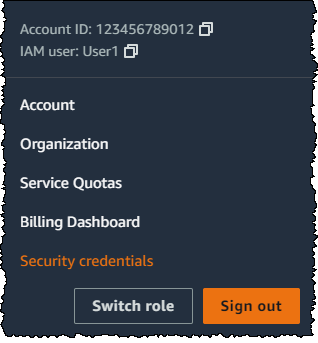
您需要為您的 AWS 帳戶獲取訪問密鑰和秘密訪問密鑰。請按照 AWS 網站上的說明進行操作。

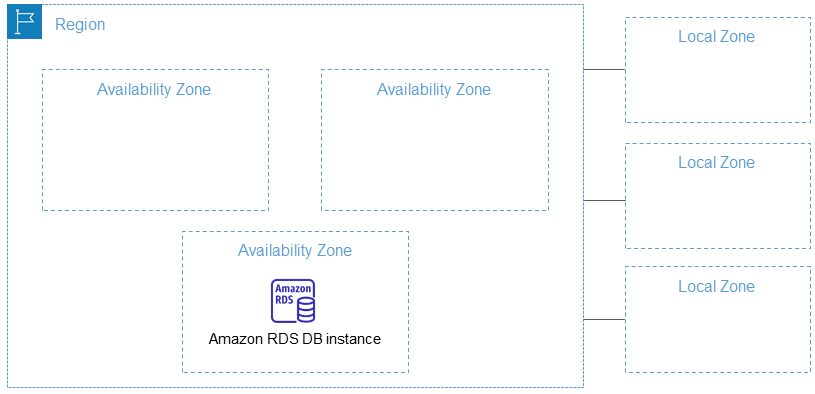
您還需要選擇一個要使用的 AWS 區域。
然後,在環境變量中設置這些值。在 Python 或 Python notebook 中,您可以使用以下代碼:
import os
os.environ["AWS_ACCESS_KEY_ID"] = <YOUR_ACCESS_KEY_ID>
os.environ["AWS_SECRET_ACCESS_KEY"] = <YOUR_SECRET_ACCESS_KEY>
os.environ["AWS_DEFAULT_REGION"] = <YOUR_AWS_REGION>
os.environ["AWS_DEFAULT_OUTPUT"] = "json"
將默認輸出設置為 json。
您也可以通過 AWS 命令行應用程序或在本地文件系統上設置 AWS 配置文件來完成此操作。更多詳細信息請參見 AWS 網站上的文檔。
tag創建角色
您還需要一個具有足夠權限的 AWS 角色來使用本教程所需的資源。
此角色必須:
- 啟用 AmazonSageMakerFullAccess。
- 滿足以下條件之一:
- 具有進行 AWS Marketplace 訂閱的權限,並啟用以下三項:
- aws-marketplace:ViewSubscriptions
- aws-marketplace:Unsubscribe
- aws-marketplace:Subscribe
- 或者您的 AWS 帳戶已訂閱 jina-embedding-model。
- 具有進行 AWS Marketplace 訂閱的權限,並啟用以下三項:
將角色的 ARN(Amazon 資源名稱)存儲在變量名 role 中:
role = <YOUR_ROLE_ARN>
有關角色的更多信息,請參見 AWS 網站上的文檔。
tag在 AWS Marketplace 上訂閱 Jina AI 模型
在本文中,我們將使用 Jina Embeddings v2 base English 模型。請在 AWS Marketplace 上訂閱它。
向下滾動頁面可以看到定價信息。AWS 按小時對市場中的模型收費,因此您將從啟動模型端點到停止它的時間內被收費。本文將向您展示如何執行這兩項操作。
我們還將使用 Jina Reranker v1 - English 模型,您需要訂閱該模型。
當您訂閱了這些模型後,請獲取您 AWS 區域的模型 ARN,並將它們分別存儲在變數名 embedding_package_arn 和 reranker_package_arn 中。本教學中的程式碼將使用這些變數名來引用它們。
如果您不知道如何獲取 ARN,請將您的 Amazon 區域名稱放入變數 region 中,並使用以下程式碼:
region = os.environ["AWS_DEFAULT_REGION"]
def get_arn_for_model(region_name, model_name):
model_package_map = {
"us-east-1": f"arn:aws:sagemaker:us-east-1:253352124568:model-package/{model_name}",
"us-east-2": f"arn:aws:sagemaker:us-east-2:057799348421:model-package/{model_name}",
"us-west-1": f"arn:aws:sagemaker:us-west-1:382657785993:model-package/{model_name}",
"us-west-2": f"arn:aws:sagemaker:us-west-2:594846645681:model-package/{model_name}",
"ca-central-1": f"arn:aws:sagemaker:ca-central-1:470592106596:model-package/{model_name}",
"eu-central-1": f"arn:aws:sagemaker:eu-central-1:446921602837:model-package/{model_name}",
"eu-west-1": f"arn:aws:sagemaker:eu-west-1:985815980388:model-package/{model_name}",
"eu-west-2": f"arn:aws:sagemaker:eu-west-2:856760150666:model-package/{model_name}",
"eu-west-3": f"arn:aws:sagemaker:eu-west-3:843114510376:model-package/{model_name}",
"eu-north-1": f"arn:aws:sagemaker:eu-north-1:136758871317:model-package/{model_name}",
"ap-southeast-1": f"arn:aws:sagemaker:ap-southeast-1:192199979996:model-package/{model_name}",
"ap-southeast-2": f"arn:aws:sagemaker:ap-southeast-2:666831318237:model-package/{model_name}",
"ap-northeast-2": f"arn:aws:sagemaker:ap-northeast-2:745090734665:model-package/{model_name}",
"ap-northeast-1": f"arn:aws:sagemaker:ap-northeast-1:977537786026:model-package/{model_name}",
"ap-south-1": f"arn:aws:sagemaker:ap-south-1:077584701553:model-package/{model_name}",
"sa-east-1": f"arn:aws:sagemaker:sa-east-1:270155090741:model-package/{model_name}",
}
return model_package_map[region_name]
embedding_package_arn = get_arn_for_model(region, "jina-embeddings-v2-base-en")
reranker_package_arn = get_arn_for_model(region, "jina-reranker-v1-base-en")
tag載入資料集
在本教學中,我們將使用 YouTube 頻道 TU Delft Online Learning 提供的影片集。該頻道製作各種 STEM 學科的教育材料。其內容採用 CC-BY 授權。


我們從該頻道下載了 193 個影片,並使用 OpenAI 的開源 Whisper 語音識別模型進行處理。我們使用最小的模型 openai/whisper-tiny 將影片轉錄為文字。
這些轉錄內容已整理成一個 CSV 檔案,您可以從這裡下載。
檔案的每一行包含:
- 影片標題
- 影片在 YouTube 上的 URL
- 影片的文字轉錄
要在 Python 中載入這些資料,首先安裝 pandas 和 requests:
pip install requests pandas
將 CSV 資料直接載入名為 tu_delft_dataframe 的 Pandas DataFrame:
import pandas
# Load the CSV file
tu_delft_dataframe = pandas.read_csv("https://raw.githubusercontent.com/jina-ai/workshops/feat-sagemaker-post/notebooks/embeddings/sagemaker/tu_delft.csv")
您可以使用 DataFrame 的 head() 方法檢查內容。在筆記本中,它應該看起來像這樣:

您還可以使用資料集中提供的 URL 觀看影片,並確認語音識別雖然不完美但基本準確。
tag啟動 Jina Embeddings v2 端點
以下程式碼將在 AWS 上啟動一個 ml.g4dn.xlarge 實例來運行嵌入模型。這可能需要幾分鐘才能完成。
import boto3
from jina_sagemaker import Client
# Choose a name for your embedding endpoint. It can be anything convenient.
embeddings_endpoint_name = "jina_embedding"
embedding_client = Client(region_name=boto3.Session().region_name)
embedding_client.create_endpoint(
arn=embedding_package_arn,
role=role,
endpoint_name=embeddings_endpoint_name,
instance_type="ml.g4dn.xlarge",
n_instances=1,
)
embedding_client.connect_to_endpoint(endpoint_name=embeddings_endpoint_name)
如果適當的話,可以更改 instance_type 來選擇不同的 AWS 雲端實例類型。
tag建立和索引資料集
現在我們已經載入了資料並運行著 Jina Embeddings v2 模型,我們可以準備和索引資料了。我們將在 FAISS 向量存儲中存儲資料,這是一個專門為 AI 應用設計的開源向量資料庫。
首先,安裝我們 RAG 應用程式的其餘必要套件:
pip install tdqm numpy faiss-cpu
tag分塊
我們需要將單個轉錄文本分割成更小的部分,即"塊",這樣我們就可以在 LLM 的提示中容納多個文本。以下代碼在句子邊界處將個別轉錄文本分割,確保所有塊預設不超過 128 個詞。
def chunk_text(text, max_words=128):
"""
Divide text into chunks where each chunk contains the maximum number
of full sentences with fewer words than `max_words`.
"""
sentences = text.split(".")
chunk = []
word_count = 0
for sentence in sentences:
sentence = sentence.strip(".")
if not sentence:
continue
words_in_sentence = len(sentence.split())
if word_count + words_in_sentence <= max_words:
chunk.append(sentence)
word_count += words_in_sentence
else:
# Yield the current chunk and start a new one
if chunk:
yield ". ".join(chunk).strip() + "."
chunk = [sentence]
word_count = words_in_sentence
# Yield the last chunk if it's not empty
if chunk:
yield " ".join(chunk).strip() + "."tag為每個區塊獲取向量嵌入
我們需要為每個區塊生成向量嵌入,以便存儲在 FAISS 資料庫中。我們使用 embedding_client.embed() 方法將文本區塊傳送至 Jina AI 向量嵌入模型端點。然後,我們將文本區塊和向量嵌入作為新的欄位 chunks 和 embeddings 添加到 pandas 資料框 tu_delft_dataframe 中:
import numpy as np
from tqdm import tqdm
tqdm.pandas()
def generate_embeddings(text_df):
chunks = list(chunk_text(text_df["Text"]))
embeddings = []
for i, chunk in enumerate(chunks):
response = embedding_client.embed(texts=[chunk])
chunk_embedding = response[0]["embedding"]
embeddings.append(np.array(chunk_embedding))
text_df["chunks"] = chunks
text_df["embeddings"] = embeddings
return text_df
print("Embedding text chunks ...")
tu_delft_dataframe = generate_embeddings(tu_delft_dataframe)
## if you are using Google Colab or a Python notebook, you can
## delete the line above and uncomment the following line instead:
# tu_delft_dataframe = tu_delft_dataframe.progress_apply(generate_embeddings, axis=1)
tag使用 Faiss 設置語義搜索
以下程式碼創建一個 FAISS 資料庫,並通過迭代 tu_delft_pandas 插入區塊和向量嵌入:
import faiss
dim = 768 # dimension of Jina v2 embeddings
index_with_ids = faiss.IndexIDMap(faiss.IndexFlatIP(dim))
k = 0
doc_ref = dict()
for idx, row in tu_delft_dataframe.iterrows():
embeddings = row["embeddings"]
for i, embedding in enumerate(embeddings):
normalized_embedding = np.ascontiguousarray(np.array(embedding, dtype="float32").reshape(1, -1))
faiss.normalize_L2(normalized_embedding)
index_with_ids.add_with_ids(normalized_embedding, k)
doc_ref[k] = (row["chunks"][i], idx)
k += 1
tag啟動 Jina Reranker v1 端點
與上面的 Jina Embedding v2 模型一樣,這段程式碼將在 AWS 上啟動一個 ml.g4dn.xlarge 實例來運行重新排序模型。同樣,可能需要幾分鐘才能運行。
import boto3
from jina_sagemaker import Client
# Choose a name for your reranker endpoint. It can be anything convenient.
reranker_endpoint_name = "jina_reranker"
reranker_client = Client(region_name=boto3.Session().region_name)
reranker_client.create_endpoint(
arn=reranker_package_arn,
role=role,
endpoint_name=reranker_endpoint_name,
instance_type="ml.g4dn.xlarge",
n_instances=1,
)
reranker_client.connect_to_endpoint(endpoint_name=reranker_endpoint_name)
tag定義查詢功能
接下來,我們將定義一個函數,用於識別與任何文本查詢最相似的文稿區塊。
這是一個兩步驟的過程:
- 使用
embedding_client.embed()方法將用戶輸入轉換為向量嵌入,就像我們在數據準備階段做的那樣。 - 將向量嵌入傳遞給 FAISS 索引以檢索最佳匹配。在下面的函數中,預設返回 20 個最佳匹配,但你可以通過
n參數來控制這個數量。
函數 find_most_similar_transcript_segment 將通過比較已存儲向量嵌入與查詢向量嵌入的餘弦值來返回最佳匹配。
def find_most_similar_transcript_segment(query, n=20):
query_embedding = embedding_client.embed(texts=[query])[0]["embedding"] # Assuming the query is short enough to not need chunking
query_embedding = np.ascontiguousarray(np.array(query_embedding, dtype="float32").reshape(1, -1))
faiss.normalize_L2(query_embedding)
D, I = index_with_ids.search(query_embedding, n) # Get the top n matches
results = []
for i in range(n):
distance = D[0][i]
index_id = I[0][i]
transcript_segment, doc_idx = doc_ref[index_id]
results.append((transcript_segment, doc_idx, distance))
# Sort the results by distance
results.sort(key=lambda x: x[2])
return [(tu_delft_dataframe.iloc[r[1]]["Title"].strip(), r[0]) for r in results]
我們還將定義一個函數,該函數訪問重新排序端點 reranker_client,將 find_most_similar_transcript_segment 的結果傳遞給它,並僅返回三個最相關的結果。它使用方法 reranker_client.rerank() 調用重新排序端點。
def rerank_results(query_found, query, n=3):
ret = reranker_client.rerank(
documents=[f[1] for f in query_found],
query=query,
top_n=n,
)
return [query_found[r['index']] for r in ret[0]['results']]
tag使用 JumpStart 加載 Mistral-Instruct
在本教程中,我們將使用 mistral-7b-instruct 模型,該模型可通過 Amazon SageMaker JumpStart 獲得,作為 RAG 系統的 LLM 部分。


運行以下程式碼以加載和部署 Mistral-Instruct:
from sagemaker.jumpstart.model import JumpStartModel
jumpstart_model = JumpStartModel(model_id="huggingface-llm-mistral-7b-instruct", role=role)
model_predictor = jumpstart_model.deploy()
訪問此 LLM 的端點存儲在變量 model_predictor 中。
tag使用 JumpStart 的 Mistral-Instruct
以下是使用Python 內建的字符串模板類為此應用程序創建 Mistral-Instruct 提示模板的程式碼。它假設每個查詢都有三個匹配的文稿區塊將提供給模型。
你可以自己嘗試修改此模板以修改此應用程序或看看是否能獲得更好的結果。
from string import Template
prompt_template = Template("""
<s>[INST] Answer the question below only using the given context.
The question from the user is based on transcripts of videos from a YouTube
channel.
The context is presented as a ranked list of information in the form of
(video-title, transcript-segment), that is relevant for answering the
user's question.
The answer should only use the presented context. If the question cannot be
answered based on the context, say so.
Context:
1. Video-title: $title_1, transcript-segment: $segment_1
2. Video-title: $title_2, transcript-segment: $segment_2
3. Video-title: $title_3, transcript-segment: $segment_3
Question: $question
Answer: [/INST]
""")
有了這個組件,我們現在擁有了一個完整的 RAG 應用程序的所有部分。
tag查詢模型
查詢模型是一個三步驟的過程。
- 根據查詢搜索相關區塊。
- 組裝提示。
- 將提示發送到 Mistral-Instruct 模型並返回其答案。
要搜索相關區塊,我們使用上面定義的 find_most_similar_transcript_segment 函數。
question = "When was the first offshore wind farm commissioned?"
search_results = find_most_similar_transcript_segment(question)
reranked_results = rerank_results(search_results, question)
您可以按重新排序檢視搜索結果:
for title, text, _ in reranked_results:
print(title + "\n" + text + "\n")
結果:
Offshore Wind Farm Technology - Course Introduction
Since the first offshore wind farm commissioned in 1991 in Denmark, scientists and engineers have adapted and improved the technology of wind energy to offshore conditions. This is a rapidly evolving field with installation of increasingly larger wind turbines in deeper waters. At sea, the challenges are indeed numerous, with combined wind and wave loads, reduced accessibility and uncertain-solid conditions. My name is Axel Vire, I'm an assistant professor in Wind Energy at U-Delf and specializing in offshore wind energy. This course will touch upon the critical aspect of wind energy, how to integrate the various engineering disciplines involved in offshore wind energy. Each week we will focus on a particular discipline and use it to design and operate a wind farm.
Offshore Wind Farm Technology - Course Introduction
I'm a researcher and lecturer at the Wind Energy and Economics Department and I will be your moderator throughout this course. That means I will answer any questions you may have. I'll strengthen the interactions between the participants and also I'll get you in touch with the lecturers when needed. The course is mainly developed for professionals in the field of offshore wind energy. We want to broaden their knowledge of the relevant technical disciplines and their integration. Professionals with a scientific background who are new to the field of offshore wind energy will benefit from a high-level insight into the engineering aspects of wind energy. Overall, the course will help you make the right choices during the development and operation of offshore wind farms.
Offshore Wind Farm Technology - Course Introduction
Designed wind turbines that better withstand wind, wave and current loads Identify great integration strategies for offshore wind turbines and gain understanding of the operational and maintenance of offshore wind turbines and farms We also hope that you will benefit from the course and from interaction with other learners who share your interest in wind energy And therefore we look forward to meeting you online.
我們可以直接在提示模板中使用這些信息:
prompt_for_llm = prompt_template.substitute(
question = question,
title_1 = search_results[0][0],
segment_1 = search_results[0][1],
title_2 = search_results[1][0],
segment_2 = search_results[1][1],
title_3 = search_results[2][0],
segment_3 = search_results[2][1],
)
打印生成的字符串,看看實際發送給 LLM 的提示是什麼:
print(prompt_for_llm)
<s>[INST] Answer the question below only using the given context.
The question from the user is based on transcripts of videos from a YouTube
channel.
The context is presented as a ranked list of information in the form of
(video-title, transcript-segment), that is relevant for answering the
user's question.
The answer should only use the presented context. If the question cannot be
answered based on the context, say so.
Context:
1. Video-title: Offshore Wind Farm Technology - Course Introduction, transcript-segment: Since the first offshore wind farm commissioned in 1991 in Denmark, scientists and engineers have adapted and improved the technology of wind energy to offshore conditions. This is a rapidly evolving field with installation of increasingly larger wind turbines in deeper waters. At sea, the challenges are indeed numerous, with combined wind and wave loads, reduced accessibility and uncertain-solid conditions. My name is Axel Vire, I'm an assistant professor in Wind Energy at U-Delf and specializing in offshore wind energy. This course will touch upon the critical aspect of wind energy, how to integrate the various engineering disciplines involved in offshore wind energy. Each week we will focus on a particular discipline and use it to design and operate a wind farm.
2. Video-title: Offshore Wind Farm Technology - Course Introduction, transcript-segment: For example, we look at how to characterize the wind and wave conditions at a given location. How to best place the wind turbines in a farm and also how to retrieve the electricity back to shore. We look at the main design drivers for offshore wind turbines and their components. We'll see how these aspects influence one another and the best choices to reduce the cost of energy. This course is organized by the two-delfd wind energy institute, an interfaculty research organization focusing specifically on wind energy. You will therefore benefit from the expertise of the lecturers in three different faculties of the university. Aerospace engineering, civil engineering and electrical engineering. Hi, my name is Ricardo Pareda.
3. Video-title: Systems Analysis for Problem Structuring part 1B the mono actor perspective example, transcript-segment: So let's assume the demarcation of the problem and the analysis of objectives has led to the identification of three criteria. The security of supply, the percentage of offshore power generation and the costs of energy provision. We now reason backwards to explore what factors have an influence on these system outcomes. Really, the offshore percentage is positively influenced by the installed Wind Power capacity at sea, a key system factor. Capacity at sea in turn is determined by both the size and the number of wind farms at sea. The Ministry of Economic Affairs cannot itself invest in new wind farms but hopes to simulate investors and energy companies by providing subsidies and by expediting the granting process of licenses as needed.
Question: When was the first offshore wind farm commissioned?
Answer: [/INST]
通過方法 model_predictor.predict() 將此提示傳遞給 LLM 端點 — model_predictor:
answer = model_predictor.predict({"inputs": prompt_for_llm})
這會返回一個列表,但由於我們只傳入了一個提示,所以它將是一個只有一個條目的列表。每個條目都是一個 dict,其中響應文本位於鍵 generated_text 下:
answer = answer[0]['generated_text']
print(answer)
結果:
The first offshore wind farm was commissioned in 1991. (Context: Video-title: Offshore Wind Farm Technology - Course Introduction, transcript-segment: Since the first offshore wind farm commissioned in 1991 in Denmark, ...)
讓我們通過編寫一個函數來簡化查詢:將字符串問題作為參數並返回答案字符串:
def ask_rag(question):
search_results = find_most_similar_transcript_segment(question)
reranked_results = rerank_results(search_results, question)
prompt_for_llm = prompt_template.substitute(
question = question,
title_1 = search_results[0][0],
segment_1 = search_results[0][1],
title_2 = search_results[1][0],
segment_2 = search_results[1][1],
title_3 = search_results[2][0],
segment_3 = search_results[2][1],
)
answer = model_predictor.predict({"inputs": prompt_for_llm})
return answer[0]["generated_text"]
現在我們可以問更多問題了。答案將取決於視頻轉錄的內容。例如,當答案存在於數據中時,我們可以提出詳細問題並得到答案:
ask_rag("What is a Kaplan Meyer estimator?")
The Kaplan Meyer estimator is a non-parametric estimator for the survival
function, defined for both censored and not censored data. It is represented
as a series of declining horizontal steps that approaches the truths of the
survival function if the sample size is sufficiently large enough. The value
of the empirical survival function obtained is assumed to be constant between
two successive distinct observations.
ask_rag("Who is Reneville Solingen?")
Reneville Solingen is a professor at Delft University of Technology in Global
Software Engineering. She is also a co-author of the book "The Power of Scrum."
answer = ask_rag("What is the European Green Deal?")
print(answer)
The European Green Deal is a policy initiative by the European Union to combat
climate change and decarbonize the economy, with a goal to make Europe carbon
neutral by 2050. It involves the use of green procurement strategies in various
sectors, including healthcare, to reduce carbon emissions and promote corporate
social responsibility.
我們也可以提出超出可用信息範圍的問題:
ask_rag("What countries export the most coffee?")
Based on the context provided, there is no clear answer to the user's
question about which countries export the most coffee as the context
only discusses the Delft University's cafeteria discounts and sustainable
coffee options, as well as lithium production and alternatives for use in
electric car batteries.
ask_rag("How much wood could a woodchuck chuck if a woodchuck could chuck wood?")
The context does not provide sufficient information to answer the question.
The context is about thermit welding of rails, stress concentration factors,
and a lyrics video. There is no mention of woodchucks or the ability of
woodchuck to chuck wood in the context.
試試您自己的查詢。您還可以更改 LLM 的提示方式,看看是否可以改善結果。
tag關閉
因為您按小時計費使用的模型和運行它們的 AWS 基礎設施,所以完成本教程後關閉所有三個 AI 模型非常重要:
- 嵌入模型端點
embedding_client - 重排序模型端點
reranker_client - 大語言模型端點
model_predictor
要關閉所有三個模型端點,請運行以下代碼:
# shut down the embedding endpoint
embedding_client.delete_endpoint()
embedding_client.close()
# shut down the reranker endpoint
reranker_client.delete_endpoint()
reranker_client.close()
# shut down the LLM endpoint
model_predictor.delete_model()
model_predictor.delete_endpoint()
tag立即開始使用 AWS Marketplace 上的 Jina AI 模型
通過我們在 SageMaker 上的嵌入和重排序模型,AWS 上的企業 AI 用戶現在可以立即訪問 Jina AI 的卓越價值主張,而不會影響其現有雲操作的優勢。AWS 的所有安全性、可靠性、一致性和可預測定價都是內置的。
在 Jina AI,我們正在努力將最先進的技術帶給可以從將 AI 引入現有流程中受益的企業。我們致力於通過便捷實用的接口以合理的價格提供穩固、可靠、高性能的模型,最大限度地減少您在 AI 上的投資,同時最大限度地提高您的回報。
查看 Jina AI 的 AWS Marketplace 頁面,瞭解我們提供的所有嵌入和重排序模型的列表,並免費試用我們的模型七天。
我們非常樂意瞭解您的使用案例,並討論 Jina AI 的產品如何能滿足您的業務需求。請透過我們的網站或Discord 頻道與我們聯繫,分享您的回饋意見並取得我們最新模型的最新資訊。


